Modern companies make huge amounts of data every single day, yet the raw numbers by themselves don’t really guide the people who must decide. Most of the time, firms require a more clear, organized route to look at sales, finance, stock levels, customer connections, and day to day operations in one single view. And it’s kind of here that Odoo dashboards turn into a key business intelligence instrument.
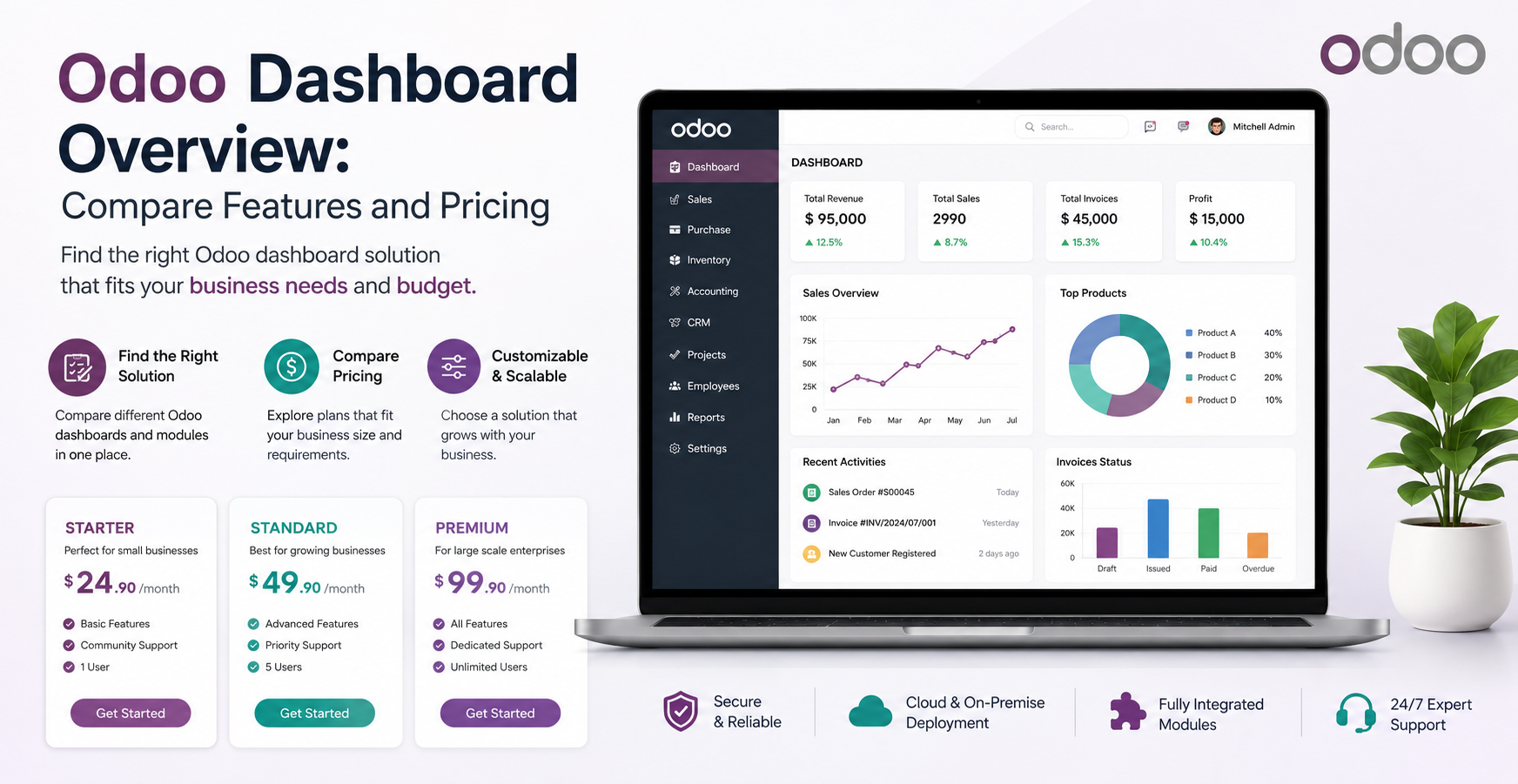
A quick Odoo dashboard overview shows how these dashboards gather, arrange, and show live insights coming from different Odoo modules. So if you’re handling accounting, sales, manufacturing, HR, or inventory , you’re basically getting a smoother way to digest complicated reports. Charts, graphs, and KPIs feel simpler and more direct, even when the original data is a bit messy. Also, figuring out Odoo dashboards pricing matters a lot because teams can better pick the proper setup, matching their budget, their company size, and the kind of reporting they actually need.
What Is an Odoo Dashboard?
An Odoo dashboard is kind of a visual reporting interface that shows business data in real time, and it lets you see what’s going on without constantly jumping around. Rather than opening a bunch of reports from different modules, users can keep an eye on important business metrics from one single screen . These dashboards turn raw database records into interactive things like charts, tables, scorecards, and performance signals that help people decide quicker.
Companies use Odoo dashboards to follow sales growth, financial results, purchase orders, inventory levels, employee productivity, customer dealings, manufacturing throughput, and lots of other day to day operational measures. Since the dashboard is directly linked to the Odoo database, the information refreshes automatically any time business data changes , so you don’t really have to chase spreadsheets or do manual summaries. This removes a lot of routine reporting work and makes sure managers always see current information .
Odoo Dashboard Overview Across Different Business Modules
A complete Odoo dashboard overview, kind of like a single glass pane , tends to cover reporting for nearly every business task. Sales teams are usually able to track quotations, confirmed sales orders, revenue movements and customer performance in general. On the other side, the Accounting group can review profit and loss views, invoices, unsettled payments, tax breakdowns, plus cashflow directions over time, all from that same dashboard.
Inventory managers get clearer insight into stock availability, warehouse transfers, purchase planning, and even product demand signals. For Manufacturing, the dashboard typically helps with production orders, work center efficiency metrics, machine utilisation, and the real production timeline , not just rough estimates. And when it comes to Human Resources, managers can study employee attendance, recruitment progress, payroll summaries, and broader workforce statistics, like a snapshot that is still detailed.
Key Features of Odoo Dashboards
Odoo dashboards sort of include a range of options that help make business reporting more effective in practice. People can put together interactive charts , pivot tables, bar graphs, pie charts, line graphs, and also KPI cards that show how the business is doing in a really clear way. In most cases the dashboards support filtering by date , department, salesperson , product category, or customer segment, so you can narrow everything down fast.
Then you get real-time updates, that remove delays you’d normally get from manual reports. On top of that there is role-based access, which basically means employees only see the information that matches what they are responsible for. Many dashboards additionally offer drill-down, so users can click on a chart and then explore the underlying transactions. When you combine those visual summaries with more detailed analysis, companies can spot openings sooner and sort out issues quickly.
Benefits of Using Odoo Dashboards
Businesses can get a lot out of using Odoo dashboards, because well they boost visibility across the organisation. Decision makers end up spending less time hunting for information in endless piles of reports, and they can focus more on reviewing business outcomes. And since these dashboards pull together details from several departments it becomes easier to collaborate, people basically work from the same shared data, not different versions, not different assumptions.
There is also the part about reporting accuracy. When the information is shown in dashboards it tends to cut down on the human errors that often show up with spreadsheets. At the same time, automated dashboards reduce that repetitive “do it again” reporting cycle, while still giving management immediate access to performance signals. With reporting happening faster, the business can respond quickly to changes in the market, shifts in customer behaviour, and those everyday operational issues that pop up out of nowhere.
Odoo Dashboards Pricing Explained
If you want to understand Odoo dashboards pricing, you kinda have to look at a few moving parts, not just hunt for one clear fixed amount. In many standard Odoo apps, basic dashboard capability is already in there, so for some teams it feels almost included. But if a company really wants deeper analytics they usually end up paying extra for something like added dashboard modules , business intelligence tools, or even custom dashboard build work.
The price can swing depending on how many users there are, which Odoo edition is chosen, and how tangled the implementation becomes. Then there’s customisation needs, third party connectors integrations, and what reporting functions are required. Some organisations also want dashboards that fit their industry, and in that case they might fund tailored development, to match their day to day operational reality.
Comparing Standard Dashboards and Custom Dashboard Solutions
Businesses usually sort of compare the regular standard dashboard view with those more fully customised reporting setups before putting money into anything. The standard ones they tend to show the basic reports that cover everyday business operations, and yeah they can be rolled out faster, they only need minimal configuration, and they fit pretty well when an organisation has reporting needs that are, you know pretty straightforward and not too fussy.
Custom dashboards, on the other hand, bring more latitude. They let a business design reporting around how work actually moves, and also around performance goals that matter in the real world. A company might blend information from several modules and then craft one singular KPI set, or at least craft specific KPIs that look right for the situation. They can also hook in external data sources, which sounds small but it changes the whole picture in practice. Plus they can create executive level reporting that is tuned to what management truly wants, not just what the system happens to output by default. Even if custom solutions typically mean higher development costs, they often end up giving better long term value, especially for businesses that are still growing and evolving.
Factors That Influence Odoo Dashboards Pricing
A lot of different things affect the pricing of Odoo dashboards, not just the software itself you know. For starters, company size counts big , because larger organisations normally need more seats, extra add-ons and more elaborate reporting styles. Also, industry specific expectations can push the implementation time up, particularly when certain specialized dashboard pages or “views” are meant to be built from scratch, not merely adjusted.
Then there’s the whole integration angle. If the dashboards must tie in with external tools such as CRM systems, e commerce websites , payment gateways, or even outside databases, the work usually expands. And don’t forget the human side: employee training, constant upkeep, report refresh cycles after each Odoo update, plus the technical support you’ll probably rely on. These small pieces, add up over time. That’s why they really matter when you try to estimate the actual total investment, the full picture not the “just the license” idea.
How to Choose the Right Odoo Dashboard Solution
Choosing the right dashboard solution starts , mostly, by sort of pinning down the business goals and how reporting is supposed to work. In real life, Organisations have to figure out which departments are actually going to use the dashboards, what KPIs are worth watching , and how often those views should refresh. Once that is clear early on it tends to stop pointless customisation from creeping in, while also making sure the most meaningful insights stay easy to locate, not buried behind extra layers or odd navigation.
You also want to look at future scalability, because a dashboard solution that keeps pace with company growth can reduce later redevelopment costs. And working together with a seasoned Odoo implementation partner can help quite a bit with overall dashboard performance. Reports are usually shaped with well known industry best practices , but they also preserve data accuracy and keep system efficiency steady, not slowly drifting out of alignment over time.
Conclusion
An effective Odoo dashboard overview , kind of shows how strong visual reporting can shift the way decisions get made . When you pull live, current info from multiple departments into one unified interface , Odoo dashboards can boost productivity , make reporting more precise, and support strategic planning across organisations , in a smoother manner.
On top of that cloud hosting , the whole hosting approach can matter a lot, ther way things run . And honestly, getting your head around Odoo dashboards pricing is just as important , since costs can vary quite a bit depending on what the business actually requires. Things like how much customisation is needed , what integrations are required, and how hard the implementation gets all factor in. So by comparing the features, side by side, with the different pricing options, companies can land on a dashboard setup that delivers real value , plus actionable insights, without boxing themselves in as operations grow steadily down the road.