I’ve watched store owners struggle with a common problem. They sell products that customers want to customize, but their options are limited. A t-shirt store can’t let customers add their name. A bakery can’t let customers pick a custom message for their cake. A gift shop can’t let customers choose monogram styles. So customers either buy something generic or shop somewhere else.
Then they discover product addons. Suddenly, they can offer unlimited customization. Customers add text, choose colors, and select sizes and styles. The customization happens right on the product page before checkout. Orders come through with all the customization details already captured. Sales go up. Average order value increases. Customer satisfaction improves.
The key is using product addons strategically. Not just slapping extra fields on everything, but thinking about what your actual customers need and want. That’s what this guide is about.
Why Product Customization Actually Matters for Your Business
Before diving into how to use WooCommerce product addons, let’s be clear about why you should care.
Customization changes buyer psychology. A plain t-shirt is a commodity. A t-shirt with someone’s name embroidered on it is personal. That personalization justifies a higher price. A customer who paid $25 for a customized shirt feels ownership. They’re less likely to return it. They’re more likely to buy again.
Revenue increases when you offer customization. Some customers won’t buy unless they can personalize. You’re not just selling more of the same product. You’re enabling sales that wouldn’t happen otherwise. That’s direct revenue impact.
Customer data improves too. When customers customize products, they give you information. They tell you what text matters to them. What colors they prefer. What sizes they need. That data is useful for future marketing and product development.
The product add ons WooCommerce plugin make this possible without hiring developers or building custom solutions. It’s a built-in feature you configure, not code you maintain.
Understanding the 19 Field Types
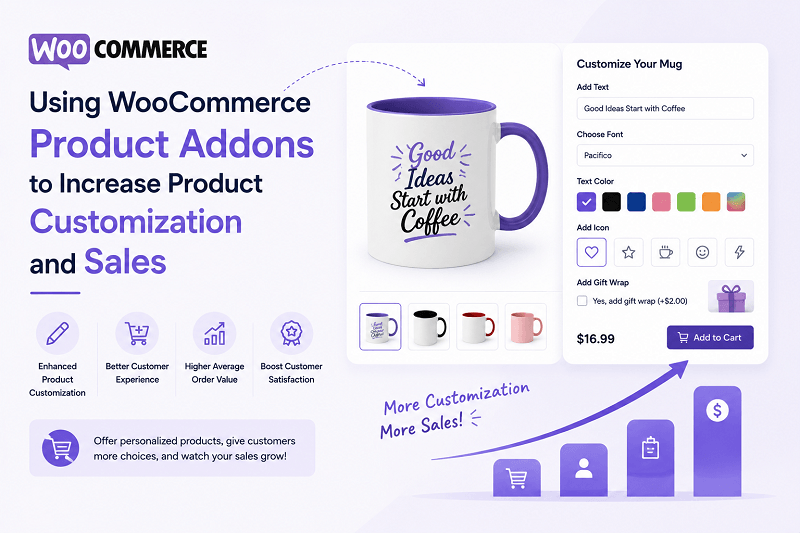
The real power of WooCommerce product addons lies in flexibility. The Extendons plugin includes 19 different field types, each serving different purposes.
Text fields let customers enter simple text. Names, dates, short messages. Someone orders a mug and adds their name. Someone orders a t-shirt and adds a date. Simple but incredibly useful.
Text areas handle longer content. Full messages, instructions, multiple lines of text. Someone orders a custom banner and adds the full event details.
Number fields restrict input to numbers only. Quantities, measurements, specific values. Someone orders custom parts and specifies exact dimensions.
Dropdowns give customers a choice between pre-defined options. Size, color, material, style. Instead of free-form text, they choose from your list. This prevents typos and ensures consistency.
Radio buttons work like dropdowns but show options visually. Customers see all choices at once. Good for when there are 3-5 options you want clearly visible.
Checkboxes let customers select multiple options from a list. Someone orders a custom pizza and checks which toppings they want. Multiple selections, multiple prices.
Color pickers let customers choose any color from a color wheel. Someone customizing a design picks their exact color preference.
Color swatches and image radio buttons show visual options. Someone choosing between leather colors sees actual leather swatches, not just color names. Someone choosing between paint finishes sees photos of each finish. This reduces guessing and returns.
Date and time fields are specific but powerful. Someone booking a service or reserving a time slot uses these fields. The backend ensures accurate scheduling.
Google Fonts field lets customers choose fonts for their design. Someone personalizing a t-shirt picks their font preference. Different fonts create different vibes.
File upload fields let customers upload their own content. Someone printing business cards uploads their logo. Someone personalizing a poster uploads their photo.
Each field type serves a specific purpose. The right field types make customization intuitive for customers and ensure you capture the information you need.
How Flexible Pricing Works
Here’s where WooCommerce product addons become genuinely powerful. Pricing isn’t one-size-fits-all. You have options.
Free addons cost nothing. Someone orders a t-shirt and adds their name for free. You do this to increase perceived value. Customers feel like they’re getting a deal. You’re not charging because the customization doesn’t increase your production cost.
Fixed price addons cost a set amount regardless of other factors. Someone orders a mug and pays $3 extra to add their photo. The price is $3 whether they add one photo or ten.
Percentage pricing charges a percentage of the product price. Someone orders a $50 custom item and you charge 10% customization fee. That’s $5. Someone orders a $100 custom item, it’s $10. Scales with product value.
Per-character pricing charges by the letter. Someone personalizing a t-shirt pays per character in their name. Short names cost less, long names cost more. This is common for embroidery and engraving work.
Quantity-based pricing multiplies by order quantity. Someone orders 10 custom t-shirts at $3 customization each equals $30 extra. Scales with order size.
You can also combine pricing types. Fixed plus percentage. Per-character for text, fixed price for images. This flexibility lets you capture the actual cost of customization while keeping things simple for customers.
Global Options vs Product-Specific Options
Think about your product catalog. Some products share the same customization needs. Others need unique options.
Global product options let you create once and apply everywhere. You set up a rule like “add customer name” and apply it to every product in your catalog. Any new products automatically get the rule. Efficient.
This works for stores with consistent customization needs. A gift shop adding monograms to everything. A t-shirt printer adding names and dates to every shirt. One set of options applies broadly.
But some products need unique options. That’s where product-specific addons come in. You go to an individual product and add options just for that product. It overrides or supplements the global options.
Maybe one product needs color selection but another doesn’t. One product charges for text customization, another includes it free. Product-specific options handle this without affecting other products.
The combination is powerful. Global options handle the common stuff. Product-specific options handle the exceptions. You don’t create redundancy. You don’t overwhelm customers with irrelevant options.
Conditional Logic Changes Everything
Here’s a feature that separates basic customization from sophisticated customization. Conditional logic shows or hides options based on what customers select.
Example: Someone’s ordering a t-shirt. The form asks what size they want. If they select “Youth,” maybe certain design options don’t display because they don’t make sense for small sizes. If they select “Adult 2XL,” different options show.
Another example: A bakery form asks cake size. If they choose the 6-inch cake, certain customization options hide because they don’t fit. If they choose the 12-inch cake, all options display.
The logic runs automatically. Customers see relevant options for their selections. They don’t see irrelevant options cluttering the form. The experience feels smart, not confusing.
This reduces decision fatigue. Customers make simpler choices because they’re not seeing irrelevant options. Fewer choices paradoxically increases completion rates.
Managing Stock for Addon Options
Some addons are limited. You only have 50 units of a certain color. You only have 100 embroidery threads in stock. WooCommerce product addons lets you manage stock for individual options.
Set a stock limit for each addon option. When customers order, the stock decreases. When you run out, customers can’t select that option. It automatically grays out or hides. No overselling.
This is critical for businesses with physical inventory. You can’t promise options you don’t have. Stock management ensures accuracy.
It’s also useful for print-on-demand operations. Maybe you’re testing a new color. You have limited inventory to offer. Set a stock limit, test demand, then reorder if it sells.
User Role-Based Visibility
Your store might have different customer types who need different customization options.
Wholesale customers might need different options than retail customers. You configure your product add ons WooCommerce plugin to show certain options only to wholesale users. Retail customers see different options.
VIP customers might get premium customization options. Regular customers get basic options. Same product, different experiences based on user role.
This requires setup but it’s powerful. You’re not creating separate products for different customer types. You’re creating one product with conditional options based on who’s buying.
Practical Implementation Strategies
Understanding features is one thing. Using them effectively is another.
Start with your most-ordered products. Where do customers ask for customization? What options do they request most? Start there. Add WooCommerce product addons for those specific requests.
Keep it simple initially. One or two customization options per product. More options feel overwhelming during checkout. Once customers are comfortable, expand.
Test pricing carefully. What customization fee makes sense? Too low and you’re not capturing value. Too high and customers abandon. Test different prices and measure conversion rates.
Use product-specific options liberally. Not every product needs every global option. An expensive item might justify more customization options. A budget item might have fewer. Tailor each product.
Conditional logic should serve customers, not confuse them. Use it when there’s a logical reason to hide options. Don’t hide options just to reduce visual clutter. Customers will feel manipulated.
Monitor what customers actually customize. Which options get selected? Which get ignored? That data tells you what’s actually valuable to customers. Double down on popular options. Consider removing unpopular ones.
Real Examples of Customization in Action
T-Shirt Printing Business
You offer custom t-shirts. Setup WooCommerce product addons with:
- Text field for customer name ($2 extra)
- Dropdown for shirt color (free)
- Radio button for design placement (free)
- Checkbox for special effects like glitter ($5 extra)
Conditional logic: If customer selects glitter, show another option for glitter color.
Result: Customers fully customize their shirt. You capture all details. Production team has exact specifications.
Gift Shop Selling Personalized Items
You sell ceramic items. Setup product addons with:
- Text field for personalization (free for 10 characters, $1 per additional character)
- Color swatches for available colors (free)
- Optional gift wrapping upgrade ($5 fixed)
The gift wrapping option appears for all items. The personalization text field appears only for items that support it (user role based).
Result: Customers personalize gifts. You charge appropriately. Orders come through with all customization details.
Custom Cake Business
You take cake orders. Setup product addons with:
- Dropdown for cake size (different prices)
- Conditional dropdown: If size is small, show fewer topping options. If size is large, show all toppings.
- Text field for custom message (free)
- Date picker for delivery date
Result: Customers order customized cakes. Smaller sizes show fewer options so they don’t overwhelm. You capture delivery dates automatically. No back-and-forth emails.
Corporate Promotional Products
Bulk orders for company swag. Setup product addons with:
- Text field for company name (free)
- Dropdown for logo style (free)
- Number field for quantity ordered (pre-filled)
- File upload for custom artwork (free)
Show these options only to logged-in wholesale users. Retail customers see none of these.
Result: Companies order bulk items with their customization. All details captured in one place. No email chains about specifications.
Common Mistakes to Avoid
Too many options overwhelms customers. If your product has 15 customization fields, many customers will abandon. Keep it focused. Ask yourself: which options do customers actually need?
Unclear pricing confuses people. Make customization costs obvious. If adding text costs extra, say so upfront. Don’t hide fees in the fine print.
Ignoring visual elements misses opportunity. Use color swatches instead of color names. Use images instead of descriptions. Visual options reduce buyer uncertainty and returns.
Not testing the experience hurts conversions. Before going live, actually use your customization form. Is it intuitive? Does conditional logic work properly? Do prices calculate correctly? Test thoroughly.
Setting options too restrictively frustrates customers. If they ask for something reasonable and can’t do it, they’ll shop elsewhere. Balance control with flexibility.
Measuring Success
You’re implementing WooCommerce product addons to improve business metrics. Track what changes.
Average order value often increases when you add customization. Customers who customize spend more than customers buying standard products. Measure this.
Conversion rate might improve. Some customers won’t buy without customization. Offering it increases sales. Track whether conversion improves.
Customer satisfaction and repeat purchase rate matter. Customers who successfully customize and receive what they ordered are happier and more likely to buy again. Survey and track this.
Return rate should decrease. Customized products are less returnable because customers specifically ordered them their way. Track returns on customized vs non-customized products.
Support requests might decrease. When customization details are captured in the system, fewer customers email asking for modifications. Less back-and-forth.
Use these metrics to decide what’s working. High-value customization options that drive conversion should expand. Low-value options that rarely get used should be removed.
Moving Forward With Customization
Product customization is no longer optional for most online stores. Customers expect it. It increases sales. It improves satisfaction. It differentiates your store from competitors.
WooCommerce product addons make this accessible without technical complexity. You configure options, set pricing, and let customers customize. The system captures everything you need for production.
Start small. Pick your most important products. Add the customization options customers actually request. Test the experience. Refine based on what you learn.
Then expand. More products, more options, more customization. As you get comfortable, get more sophisticated. Use conditional logic, user roles, stock management. These features add power once you’ve mastered the basics.
The stores winning at customization aren’t the ones with the most options. They’re the ones offering the right options, priced right, for their customers. That balance comes from listening to what customers want and testing what works.
Start there and you’ll see the impact quickly.